Nvidia Shield guide · Updated November 2026
How to mirror a Mac to an Nvidia Shield.
Your Mac can show its screen through an Nvidia Shield over Wi-Fi with its own built-in Screen Mirroring, no Apple TV needed. Telebeam runs on the Shield, so the TV it’s plugged into shows your Mac. Here’s how to check, install and connect.
For Google TV and Android TV · 7-day free trial · No ads · Open source (GPL-3.0)
Can your Shield show your Mac?
The Mac’s Screen Mirroring uses Apple’s AirPlay technology and only lists devices with a receiver for it. Telebeam adds that receiver to Google TV and Android TV devices, and the Nvidia Shield is one of the devices it’s made for, next to Chromecast with Google TV, Google TV Streamer and other Android TV boxes. It needs Android 7 or later.
Telebeam runs on the Shield itself, so any TV the Shield is plugged into shows your Mac, even one that isn’t a smart TV.
Already in the Mac’s list?
Check first: with the Shield on, open Control Center → Screen Mirroring on the Mac. If the Shield is already there, it has a receiver of its own and you may not need Telebeam. If it isn’t, Telebeam adds it. If both are running, Telebeam names itself “name (2)” so both show up; pick the one that works better for you.
Set it up
A few minutes, once. After that it’s three clicks on the Mac.
1. Install Telebeam on the Shield
Press Home on the remote, open the Google Play Store and search for Telebeam. Install it like any other app.
2. Open Telebeam on the Shield
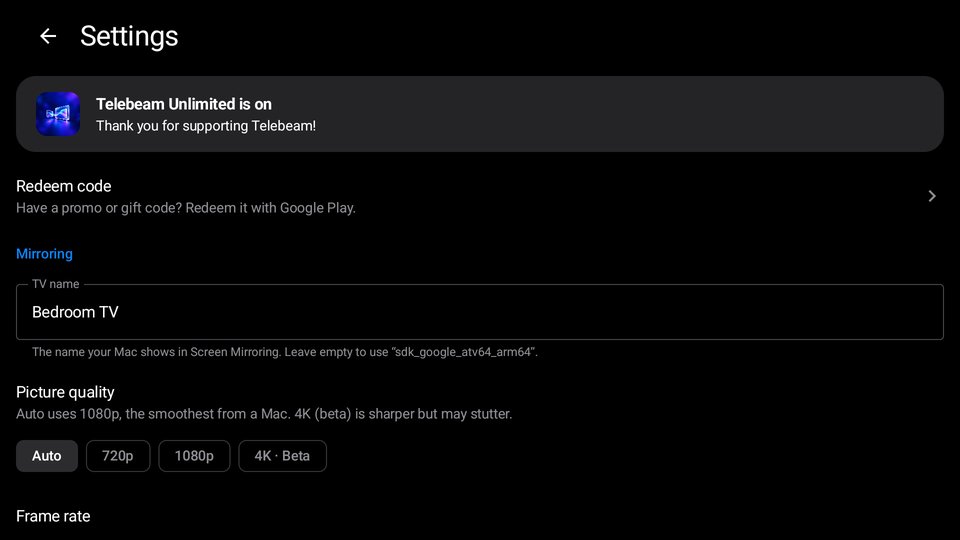
The TV shows the name your Mac will see and the steps. Give it a name you’ll recognise, like “Living Room”, in Telebeam’s settings.
3. On the Mac: Control Center → Screen Mirroring
Click the Control Center icon at the top right of the menu bar, then Screen Mirroring. Mac and Shield must be on the same Wi-Fi.
4. Pick the Shield
Your Mac’s screen appears on the TV, with sound. If nothing appears in a few seconds, choose it again. Empty desktop instead? System Settings → Displays → “When connected to TV” → Mirror Entire Screen.
Picture quality
Auto uses 1080p at 60 fps, the smoothest from a Mac. In Telebeam’s settings you can choose 720p, 1080p or 4K, and 60 or 120 fps. 4K and 120 fps are marked Beta: 4K is sharper but may stutter, and 120 fps needs a Mac with a 120 Hz ProMotion display.
Shield not in the list? See Mac doesn’t see my TV. Tested on a Philips Google TV so far; if it doesn’t run well on your Shield, write to support@telebeam.app during your trial.
Questions people ask
Can an Nvidia Shield receive my Mac’s Screen Mirroring?
With Telebeam, yes. The Mac’s built-in Screen Mirroring uses Apple’s AirPlay technology; Telebeam is the receiver on the Shield, so the Shield appears in the Mac’s list.
Can I mirror my MacBook to an Nvidia Shield without an Apple TV?
Yes. Install Telebeam on the Shield, open it, then choose it in Control Center → Screen Mirroring on the Mac.
Does the TV need to be a smart TV?
No. Telebeam runs on the Shield, so any TV the Shield is plugged into shows your Mac.
Has Telebeam been tested on the Nvidia Shield?
Not yet. It is made for Google TV and Android TV, the Shield included, and has been tested on a Philips Google TV so far. If it doesn’t run well on your Shield, write to support@telebeam.app during your trial.
Why doesn’t my Shield show up in Screen Mirroring?
Check that Telebeam is open on the Shield and that the Mac and the Shield are on the same Wi-Fi. Guest, hotel and many office or school networks keep devices from seeing each other.
Do I need to install anything on the Mac?
No. Screen Mirroring is built into macOS; Telebeam runs on the Shield only.
More Telebeam guides
Your Mac on the TV, through the Shield
Install Telebeam on the Shield, then pick it in Screen Mirroring.
Nvidia and Shield are trademarks of NVIDIA Corporation. Telebeam is not affiliated with NVIDIA.